12. Automatically populate data using data acquisition channels.
We have introduced the basic operation methods of the DataSource object. However, in actual use, we need to populate the DataSource object with a large amount of data. If we manually populate the data using the DataSource.update_table_data() method introduced in the previous chapter, the workload will be very large.
Here we introduce how to use data acquisition channels to automatically populate data.
12.1. QTEASY data retrieval function
QTEASY Data Management Module: 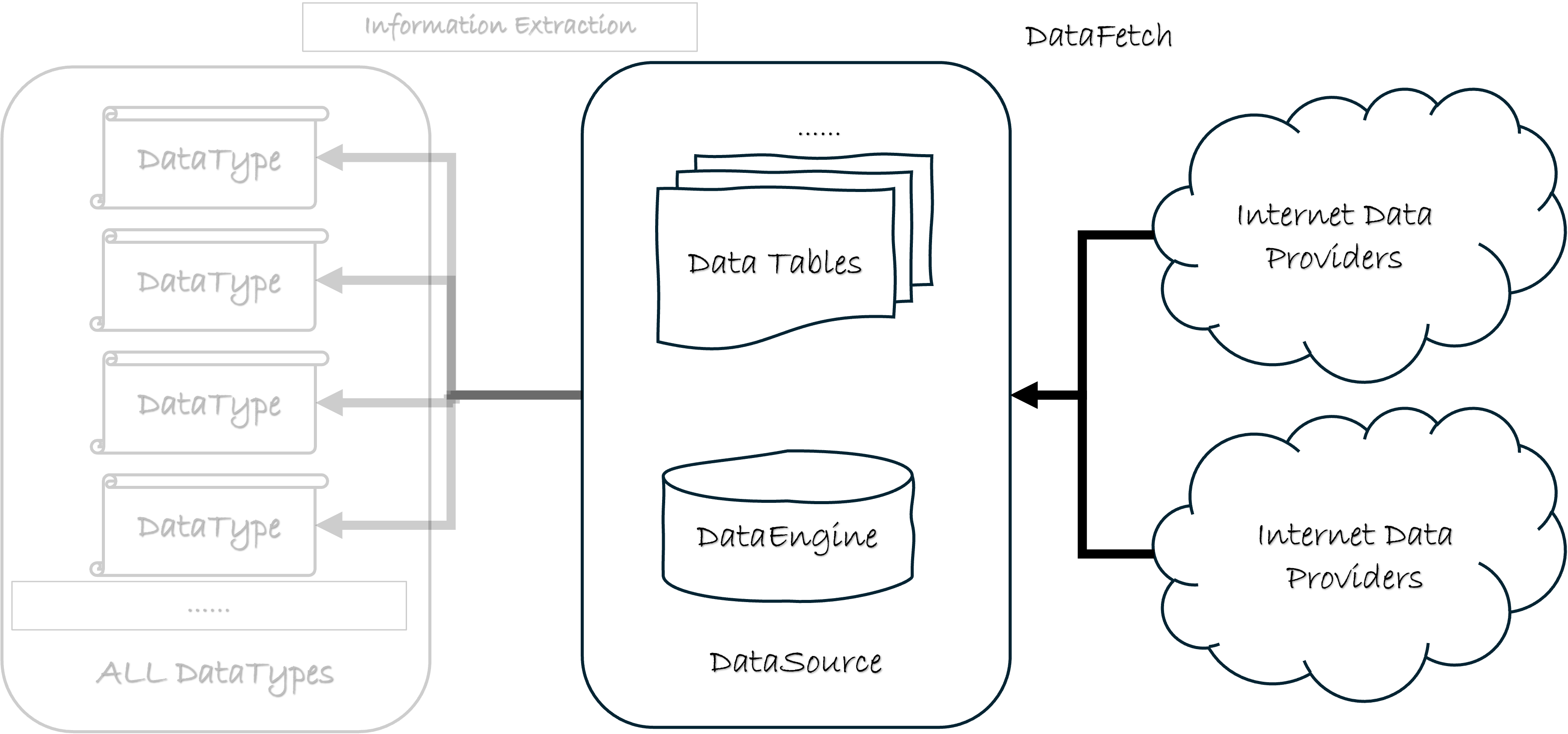
As shown in the diagram above, qteasy’s data functionality is divided into three layers. The first layer includes various data download interfaces for obtaining data from online data providers; this process is called DataFetching.
12.2. The data retrieval interface refill_data_source()
qteasy provides an automated data download interface qteasy.refill_data_source(), which can pull various financial data from multiple different online data providers to meet the usage habits of different users. The data pull API provided by qteasy features powerful multi-threaded parallel downloading, data chunking downloading, download traffic control, and error delay retry functions to adapt to the various unpredictable traffic limits of different data providers. At the same time, the data pull API can easily and automatically run batch data download tasks on a regular basis, so you don’t have to worry about missing high-frequency data.
Let’s first use an example to explain how to automatically populate data using the qteasy.refill_data_source() interface. We’ll start by creating a DataSource object that doesn’t contain any data, and then populate it with the most basic data.
>>> import qteasy as qt
>>> ds = qt.DataSource()
# 检查数据源中是否有数据
>>> ds.overview()
Analyzing local data source tables... depending on size of tables, it may take a few minutes
[########################################]104/104-100.0%  A...zing completed!
Finished analyzing datasource:
file://csv@qt_root/data/
3 table(s) out of 104 contain local data as summary below, to view complete list, print returned DataFrame
===============================tables with local data===============================
               Has_data Size_on_disk Record_count Record_start Record_end
table
trade_calendar   True       1.8MB         70K          CFFEX        SZSE
stock_basic      True       852KB          5K           None        None
stock_daily      True      98.8MB        1.3M       20211112    20241231
As we can see, the DataSource object already contains some data tables. To conduct the following tests, we will first delete the data from the trade_calendar and stock_daily data tables, and then use the data retrieval interface to automatically populate them.
First, delete two data tables. To delete a data table, first set the allow_drop_table attribute of the data source to True, and then delete the data table.
>>> ds.allow_drop_table = True
>>> ds.drop_table_data('trade_calendar')
>>> ds.drop_table_data('stock_daily')
>>> ds.allow_drop_table = False
>>> overview = ds.overview()
Analyzing local data source tables... depending on size of tables, it may take a few minutes
[########################################]104/104-100.0%  A...zing completed!
Finished analyzing datasource:
file://csv@qt_root/data/
1 table(s) out of 104 contain local data as summary below, to view complete list, print returned DataFrame
===============================tables with local data===============================
            Has_data Size_on_disk Record_count Record_start Record_end
table
stock_basic   True       852KB         5K          None        None
As you can see, the data in the trade_calendar and stock_daily tables has been deleted.
Next, we will use the qteasy.refill_data_source() interface to automatically populate the data. The code is very simple, with only one line, and qteasy will do the rest automatically.
>>> qt.refill_data_source(
        tables='stock_daily',  # 指定要填充的数据表:股票日K线数据
        channel='tushare',  # 指定数据下载渠道
        data_source=ds,  # 指定需要填充的数据源对象
        start_date='20210101',  # 指定数据下载的起始日期
        end_date='20211231',  # 指定数据下载的结束日期
)

Filling data source file://csv@qt_root/data/ ...
into 2 table(s) (parallely): {'stock_daily', 'trade_calendar'}
[########################################]243/243-100.0%  <stock_daily> 2398764 wrtn in about 16 sec
[########################################]7/7-100.0%  <trade_calendar> 70054 wrtn in about 1 sec

Data refill completed! 2468818 rows written into 2/2 table(s)!
After pulling and populating the data, you can check that the data has been downloaded successfully:
>>> ds.read_table_data('stock_daily', shares='000001.SZ, 000002.SZ', start='20211111', end='20211131')

                       open   high    low  close  pre_close  change  pct_chg  \
ts_code   trade_date
000001.SZ 2021-11-11  17.35  18.43  17.32  18.35      17.40    0.95   5.4598
          2021-11-12  18.31  18.63  18.11  18.27      18.35   -0.08  -0.4360
          2021-11-15  18.35  18.63  18.20  18.43      18.27    0.16   0.8758
          2021-11-16  18.36  18.54  18.17  18.22      18.43   -0.21  -1.1394
          2021-11-17  18.15  18.30  17.98  18.11      18.22   -0.11  -0.6037
          2021-11-18  18.09  18.12  17.73  17.80      18.11   -0.31  -1.7118
          2021-11-19  17.80  18.24  17.70  18.15      17.80    0.35   1.9663
          2021-11-22  18.03  18.25  17.90  18.12      18.15   -0.03  -0.1653
          2021-11-23  18.11  18.35  17.68  17.88      18.12   -0.24  -1.3245
          2021-11-24  17.77  17.95  17.66  17.87      17.88   -0.01  -0.0559
          2021-11-25  17.74  17.79  17.63  17.68      17.87   -0.19  -1.0632
          2021-11-26  17.62  17.67  17.52  17.58      17.68   -0.10  -0.5656
          2021-11-29  17.41  17.57  17.36  17.51      17.58   -0.07  -0.3982
          2021-11-30  17.54  17.68  17.35  17.44      17.51   -0.07  -0.3998
000002.SZ 2021-11-11  18.95  20.84  18.89  20.79      18.98    1.81   9.5364
          2021-11-12  20.50  20.50  19.41  19.76      20.79   -1.03  -4.9543
          2021-11-15  19.56  19.59  19.12  19.40      19.76   -0.36  -1.8219
          2021-11-16  19.29  19.57  19.21  19.24      19.40   -0.16  -0.8247
          2021-11-17  19.23  19.53  19.09  19.46      19.24    0.22   1.1435
          2021-11-18  19.35  19.40  18.98  19.09      19.46   -0.37  -1.9013
          2021-11-19  19.01  20.28  18.92  19.90      19.09    0.81   4.2431
          2021-11-22  19.90  19.95  19.19  19.22      19.90   -0.68  -3.4171
          2021-11-23  19.19  19.44  19.10  19.24      19.22    0.02   0.1041
          2021-11-24  19.12  19.38  19.00  19.30      19.24    0.06   0.3119
          2021-11-25  19.22  19.35  19.07  19.22      19.30   -0.08  -0.4145
          2021-11-26  19.15  19.15  18.95  18.99      19.22   -0.23  -1.1967
          2021-11-29  18.75  18.87  18.35  18.46      18.99   -0.53  -2.7909
          2021-11-30  18.44  18.66  18.16  18.26      18.46   -0.20  -1.0834

                             vol       amount
ts_code   trade_date
000001.SZ 2021-11-11  2084729.00  3752413.858
          2021-11-12   957546.46  1753072.716
          2021-11-15   655089.99  1203764.095
          2021-11-16   601110.48  1099113.409
          2021-11-17   664640.38  1203859.180
          2021-11-18   799843.77  1430058.311
          2021-11-19   786371.56  1414506.380
          2021-11-22   738617.80  1337768.172
          2021-11-23  1235977.96  2213817.590
          2021-11-24   741310.84  1316774.397
          2021-11-25   603532.70  1068221.304
          2021-11-26   694499.88  1219937.312
          2021-11-29   512594.71   895105.981
          2021-11-30   733616.06  1280384.552
000002.SZ 2021-11-11  3151015.76  6352746.112
          2021-11-12  2065924.12  4100076.111
          2021-11-15   959331.52  1852352.374
          2021-11-16   593989.40  1149085.955
          2021-11-17   623749.71  1205064.294
          2021-11-18   609995.75  1168010.581
          2021-11-19  1308293.09  2570652.947
          2021-11-22   877584.30  1697701.639
          2021-11-23   563435.65  1083646.252
          2021-11-24   827366.98  1587246.249
          2021-11-25   518123.06   995473.890
          2021-11-26   504023.33   959331.064
          2021-11-29   718595.81  1334479.867
          2021-11-30   713092.22  1305310.857
12.3. Features of the Data Retrieval API
Analyzing the data retrieval process, we can see that qteasy automatically completed the following tasks:
Automatic Dependency Table Lookup — Although we only specified the
stock_dailytable,qteasyautomatically detected that thetrade_calendartable was also empty, and since thestock_dailytable depends on the trading calendar table, it also automatically populated thetrade_calendartable.Download Progress Visualization —
qteasyprovides download progress visualization, allowing users to see the download progress of each data block, as well as the overall download progress. It also displays the remaining time, making it easy for users to monitor the data download status.Automatic Data Chunking — The code above downloaded daily candlestick chart data for all stocks throughout 2021, totaling 2.39 million rows. Regardless of the data source, such a massive amount of data cannot be downloaded all at once. Therefore,
qteasyautomatically chunks the data, with each chunk containing only one day’s data. As you can see, the entire year’s data was divided into 243 chunks. This chunked download significantly reduces the amount of data requested per network request, increasing the success rate and reducing the risk of being blocked.Multi-threaded Parallel Download — After implementing data chunking for download,
qteasyautomatically uses multi-threaded parallel download to speed up the data download process. The total time for downloading 243 data chunks in parallel was only 16 seconds.
With these features, qteasy’s data retrieval function can meet the data acquisition needs of almost all users. Whether downloading large amounts of data or high-frequency data, qteasy can provide efficient data download services.
Of course, in addition to the features mentioned above, qteasy offers many more features to address various situations that may arise during the download process. We will introduce these features in detail later:
Multi-channel download —
qteasyprovides multiple data download channels. Many data tables can be downloaded from multiple different channels, and the number of data retrieval channels is constantly increasing with each version update.Traffic Control — Some data channels have traffic limits on data downloads.
qteasyprovides a traffic control function that can limit the data download speed. That is, after downloading a certain number of data chunks, you can pause for a period of time. For example, pause for one minute after downloading 300 data chunks to avoid being blocked by the data channel.Error Retry — When downloading data from some data sources, network errors may occur.
qteasyprovides an error retry function, which can automatically retry the download after a failure. If the retry is unsuccessful, it will extend the retry waiting time and try again until the download is successful or the number of retries is exceeded and an error is reported.Log Recording —
qteasyprovides a data download log recording function, which can record detailed information for each data download, including the amount of data downloaded, the download time, the download speed, etc., making it convenient for users to view the data download status.
Data pulled from multiple channels
qteasy offers multiple data download channels, allowing many data tables to be downloaded from various channels. Moreover, with each version update, the number of data retrieval channels continues to increase.
refill_data_source()接口的channel参数可以指定数据下载渠道,如果不指定,qteasy会使用默认渠道tushare(见qteasy/core.py中refill_data_source的默认逻辑)。用户也可以手动指定数据下载渠道。
当前内置四通道为:tushare、akshare、eastmoney(别名 emoney)、sina。
四通道能力对照(常用表)
下表概括常用数据表在各通道下的支持情况(「支持」表示当前版本已实现映射并可走 refill 链路;「不支持」表示该通道无映射,refill 会跳过并提示)。AKShare 完整 108 表状态见仓库内维护清单 tests/akshare_data_test_checklist.md。
数据表 |
tushare |
akshare |
eastmoney |
sina |
|---|---|---|---|---|
trade_calendar |
支持(需 token/积分) |
支持 |
暂不支持 |
暂不支持 |
stock_basic |
支持(行业/上市日等完整) |
支持(代码+简称索引;行业/地域等常为空) |
部分场景不支持 |
暂不支持 |
index_basic / fund_basic |
支持 |
支持(字段少于 Tushare 的项可能为空) |
部分 |
暂不支持 |
stock_daily / weekly / monthly |
支持 |
支持 |
支持(日/部分分) |
支持(日/分) |
stock_5/15/30min、hourly |
支持 |
支持 |
支持 |
支持 |
stock_adj_factor |
支持 |
支持(新浪因子源) |
暂不支持 |
暂不支持 |
index_daily / weekly / monthly |
支持 |
支持 |
支持(日) |
暂不支持 |
fund_daily / weekly / monthly / 1min |
支持 |
支持 |
部分 |
暂不支持 |
stock_suspend / money_flow / dividend |
支持 |
支持 |
暂不支持 |
暂不支持 |
new_share / stock_company |
支持 |
支持(字段可能少于 Tushare) |
暂不支持 |
暂不支持 |
realtime_bars / realtime_quotes |
支持 |
支持 |
支持 |
支持 |
index_1min 等指数分钟 |
支持 |
暂不支持(待 spike) |
支持 |
暂不支持 |
说明:
basics 表与
merge_type='update':对table_usage=='basics'的表(如stock_basic、index_basic、fund_basic等),主键冲突时仅用下载侧非空字段覆盖对应列,下载值为空字符串或NULL时保留本地已有值。因此可用 AKShare 补全代码列表拉分钟线依赖表,而不会冲掉此前用 Tushare 写入的industry、list_date等。按行业/地域筛选股票(filter_stocks/filter_stock_codes)仍建议以 Tushare 的stock_basic为准或先确认本地行业列非空。tushare:覆盖最全,多数表需配置
tushare_token及相应积分/权限。akshare:无需 token;当前 25 张历史/基础/事件表已实现(见
tests/akshare_data_test_checklist.md),其余表仍为blocked或not_supported。stock_basic等 basics 表仅保证 代码与名称索引,不替代 Tushare 完整基本面。eastmoney:无需 token;分钟线覆盖较全,部分基础表(如
stock_basic)可能无法从此通道拉取。sina:无需 token;以股票日线与分钟线为主,无周/月线等。
The following code attempts to download daily candlestick data from the stock_daily data table for the first two months of 2025 from the eastmoney data channel:
>>> qt.refill_data_source(
        tables='stock_daily',
        channel='eastmoney',   # 指定数据下载渠道为东方财经
        data_source=ds,
        start_date='20250101',
        end_date='20250301',
)

Filling data source file://csv@qt_root/data/ ...
into 2 table(s) (parallely): {'stock_daily', 'stock_basic'}
[########################################]11078/11078-100.0%  <stock_daily> 131264304 wrtn in about 17 min
[----------------------------------------]0/1-0.0%  <stock_basic> can't be fetched from channel:eastmoney!

Data refill completed! 131264304 rows written into 1/2 table(s)!
Verify that the data was downloaded successfully:
>>> ds.read_table_data('stock_daily', shares='000001.SZ, 000002.SZ', start='20250101', end='20250103')

                       open   high    low  close  pre_close  change  pct_chg  \
ts_code   trade_date
000001.SZ 2025-01-13  11.25  11.26  11.08  11.20      11.30   -0.10  -0.8850
          2025-01-14  11.20  11.40  11.19  11.38      11.20    0.18   1.6071
          2025-01-15  11.38  11.58  11.36  11.48      11.38    0.10   0.8787
          2025-01-16  11.55  11.59  11.47  11.57      11.48    0.09   0.7840
          2025-01-17  11.53  11.55  11.42  11.45      11.57   -0.12  -1.0372
          2025-01-20  11.50  11.52  11.40  11.42      11.45   -0.03  -0.2620
          2025-01-21  11.45  11.45  11.32  11.33      11.42   -0.09  -0.7881
          2025-01-22  11.32  11.33  11.08  11.09      11.33   -0.24  -2.1183
          2025-01-23  11.17  11.40  11.17  11.32      11.09    0.23   2.0739
          2025-01-24  11.32  11.39  11.22  11.34      11.32    0.02   0.1767
          2025-01-27  11.38  11.55  11.38  11.47      11.34    0.13   1.1464
000002.SZ 2025-01-13   6.60   6.77   6.55   6.76       6.69    0.07   1.0463
          2025-01-14   6.76   6.93   6.75   6.91       6.76    0.15   2.2189
          2025-01-15   6.88   6.96   6.79   6.86       6.91   -0.05  -0.7236
          2025-01-16   6.90   7.07   6.84   6.88       6.86    0.02   0.2915
          2025-01-17   6.58   6.65   6.45   6.63       6.88   -0.25  -3.6337
          2025-01-20   6.60   6.94   6.48   6.85       6.63    0.22   3.3183
          2025-01-21   6.84   7.54   6.82   7.36       6.85    0.51   7.4453
          2025-01-22   7.27   7.36   6.98   7.02       7.36   -0.34  -4.6196
          2025-01-23   7.15   7.70   7.08   7.36       7.02    0.34   4.8433
          2025-01-24   7.33   7.54   7.21   7.39       7.36    0.03   0.4076
          2025-01-27   7.38   7.56   7.22   7.27       7.39   -0.12  -1.6238

                            vol       amount
ts_code   trade_date
000001.SZ 2025-01-13   934966.0  1044904.416
          2025-01-14   824629.0   934467.766
          2025-01-15  1031631.0  1185403.653
          2025-01-16   872964.0  1007689.274
          2025-01-17   689765.0   791230.419
          2025-01-20   832029.0   953092.179
          2025-01-21   902069.0  1024879.174
          2025-01-22  1347129.0  1504818.607
          2025-01-23  1514920.0  1715172.472
          2025-01-24   944944.0  1069899.088
          2025-01-27  1151935.0  1324270.607
000002.SZ 2025-01-13   911147.0   611005.036
          2025-01-14  1116454.0   765177.082
          2025-01-15   887294.0   608363.557
          2025-01-16  1110545.0   771648.218
          2025-01-17  3620283.0  2369977.993
          2025-01-20  2988167.0  2009728.944
          2025-01-21  5849397.0  4290640.172
          2025-01-22  3448728.0  2457396.391
          2025-01-23  4416581.0  3245710.622
          2025-01-24  2555024.0  1885566.128
          2025-01-27  2151753.0  1580357.769
The data download was clearly successful. Analyzing the download process above, several characteristics can be observed:
Data downloaded from different channels is in the same format. This is a design principle of
qteasy. Data downloaded from different channels will undergo the same cleaning process. This allows users to easily switch between different data download channels without worrying about data processing problems caused by different data formats.Different download channels use different chunking methods, resulting in varying download speeds. The
eastmoneydata channel is slower, taking approximately 17 minutes to complete. This is due to the specific limitations of each download channel.Different download channels may allow downloading different data tables. Some data tables may not be downloadable through certain channels, possibly due to permission restrictions or other factors. If a data table cannot be downloaded,
qteasywill automatically skip that data table without affecting the download of other data tables.
Therefore, users need to choose different channels to retrieve data based on their own circumstances.
通道切换与配置
一次性下载(脚本 / 交互):在 refill_data_source(..., channel='...') 中显式传入通道名即可,例如 Tushare 与 AKShare 对比如下:
>>> qt.refill_data_source(tables='stock_daily', channel='tushare', start_date='20240101', end_date='20240131')
>>> qt.refill_data_source(tables='stock_daily', channel='akshare', start_date='20240101', end_date='20240131')
实盘默认渠道(写入 qteasy.cfg 或通过 qt.configure() 修改):
配置键 |
含义 |
默认值 |
|---|---|---|
|
Trader 日更自动 refill 使用的通道 |
|
|
实盘获取实时价格的通道 |
|
示例:
>>> qt.configure(live_trade_data_refill_channel='akshare')
>>> qt.configure(live_price_acquire_channel='akshare')
修改后,实盘任务会使用新通道执行 refill / 取价;历史脚本仍可在每次 refill_data_source 调用中单独指定 channel,与全局配置无关。
Implement download traffic control
qteasy’s refill_data_source provides a flow control function that can limit the data download speed. That is, after downloading a certain number of data chunks, it can pause for a period of time. For example, it can pause for one minute after downloading 300 data chunks to avoid being blocked by the data channel.
This functionality is achieved through the download_batch_size and download_batch_interval parameters of the refill_data_source() interface:
The
download_batch_sizeparameter specifies the number of data chunks downloaded each time. If it is set to 300, the download will pause for a period of time after downloading 300 data chunks.The
download_batch_intervalparameter specifies the pause time after each data chunk is downloaded; the default value is 0, meaning no pause.
The following code demonstrates how to implement download traffic control using the download_batch_size and download_batch_interval parameters:
>>> qt.refill_data_source(
        tables='stock_daily',
        channel='tushare',
        data_source=ds,
        start_date='20250101',
        end_date='20250301',
        download_batch_size=300,  # 每次下载300个数据分块
        download_batch_interval=60,  # 每次下载300个数据分块后暂停60秒
)
If traffic control is used, the download time will naturally be longer, but for some data channels, this is necessary; otherwise, the download may be blocked or encounter errors, leading to download failure.
Implement error retries
It should be noted that if an error occurs during the data download process, qteasy will automatically retry the download. The retry mechanism is as follows:
After the first download fails, a short wait will occur before retrying; the default wait time is 1.0 second.
Each time a retry fails, the waiting time will increase, with the default waiting time increasing to twice the original value. That is, the first time waits for 1.0 second, the second time waits for 2.0 seconds, the third time waits for 4.0 seconds, and so on.
Retrying will stop and an error will be reported after the maximum number of retries is exceeded. By default, the maximum number of retries is 7.
The above three error retry parameters are all set through the qteasy configuration file. Users can view or modify these parameters through the qt.config() interface, or they can modify these parameters in the initial configuration file of qteasy.
hist_dnld_retry_cnt- Maximum number of retries, defaults to 7.hist_dnld_retry_wait- The wait time for the first retry, the default is 1.0 second.hist_dnld_backoff- The multiplier for increasing the retry wait time; the default is 2.0.
For instructions on how to modify the configuration file, or to use the initial configuration file for qteasy, please refer to the configuration file section of qteasy (…/api/api_reference.rst).
Logging
qteasy provides a data download log recording function, which can record detailed information for each data download, including the amount of data downloaded, the download time, the download speed, etc., making it convenient for users to check the data download status.
Other functions
The qteasy refill_data_source() interface also provides other functionalities, such as:
To limit the range of downloaded data, you can use the
start_dateandend_dateparameters to restrict the time range of downloaded data, and thesharesparameter to restrict the range of stocks to be downloaded.未传
start_date/end_date时的默认行为:内部将start_date视为该表映射中的最早可用日(如new_share为19700101),end_date视为当天。因此tables='basics'会包含需按日期分块下载的new_share(IPO 新股);若不传日期,会从 1970-01-01 分块拉至今日,耗时较长。若只需代码/行业类 basics、不要 IPO 表,请显式指定表名或传入较窄的日期窗。To configure whether to download in parallel, you can use the
parallelparameter. If set to False, downloads will be performed serially; otherwise, they will be performed in parallel.To configure whether to download dependency tables, you can use the
download_dependentparameter. If set to False, dependency tables will not be downloaded; otherwise, they will be downloaded.Configure whether to force an update of the transaction calendar.
For further explanation of this interface, please refer to the qteasy API documentation (…/api/history_data.rst).