1. Qteasy Financial Historical Data Management
qteasy is a comprehensive quantitative trading toolkit, and the acquisition and use of financial data is one of the core functions provided by qteasy.
1.1. Overview
Currently, there are many different online channels for obtaining financial data, allowing quantitative traders to download financial data. However, downloading data directly from the internet has several drawbacks:
Inconsistent data formats: For the same data, such as trading volume data, some channels provide the data in “lots,” while others provide the data in “shares.”
The amount of data that can be extracted is limited: especially data obtained through web scraping, high-frequency candlestick data often only has data from the past few days, and data from earlier periods is not available.
Data extraction is unstable: the speed and success rate of data extraction cannot be guaranteed and are greatly affected by network connectivity.
Download costs are high: Paid data channels often provide more comprehensive data, but generally have traffic limits, while free channels offer incomplete data, which also increases costs.
Information extraction is not easy: After obtaining the raw data, it is necessary to further transform the data into the required information, a process that is laborious and not intuitive.
qteasy was designed to address the pain points mentioned above.
The financial data management module of qteasy provides three main functions, all designed with the goal of…
Data Retrieval: Retrieves diverse financial data from multiple online data providers to cater to different user habits.
The data retrieval API provided by
qteasyfeatures powerful multi-threaded parallel downloading, data chunking downloading, download traffic control, and error delay retry capabilities to adapt to various abnormal traffic limits of different data providers. At the same time, the data retrieval API can easily and automatically run batch data download tasks on a regular basis, so you don’t have to worry about missing high-frequency data.Data Cleaning and Storage: Standardize and define local data storage, cleaning and organizing data pulled from the network before saving it to a local database.
qteasydefines a dedicatedDataSourceclass for storing historical financial data, and predefines a large number of standardized financial historical data storage tables. Regardless of the data source, the final stored data is always cleaned and stored in a uniform format in theDataSource, avoiding discrepancies caused by data from different periods and sources, and ensuring high-quality data storage. It also provides multiple storage engines to meet the usage habits of different users.Information Extraction and Use: Distinguishing between “data” and “information,” the system provides an interface to extract truly meaningful information from data tables, enabling direct use in trading strategies or data analysis.
We know that “data” is not the same as “information.” Simply storing a data table locally does not mean that the information within it can be used immediately.
qteasyspecifically defines the usable “information” in a data table asDataTypeobjects in a standardized way, simplifying the data access process and the definition of strategies. The unified API makes obtaining information more direct and user-friendly.
In general, the structure of the data acquisition module in qteasy can be represented by the following diagram:
QTEASY Data Management Module: 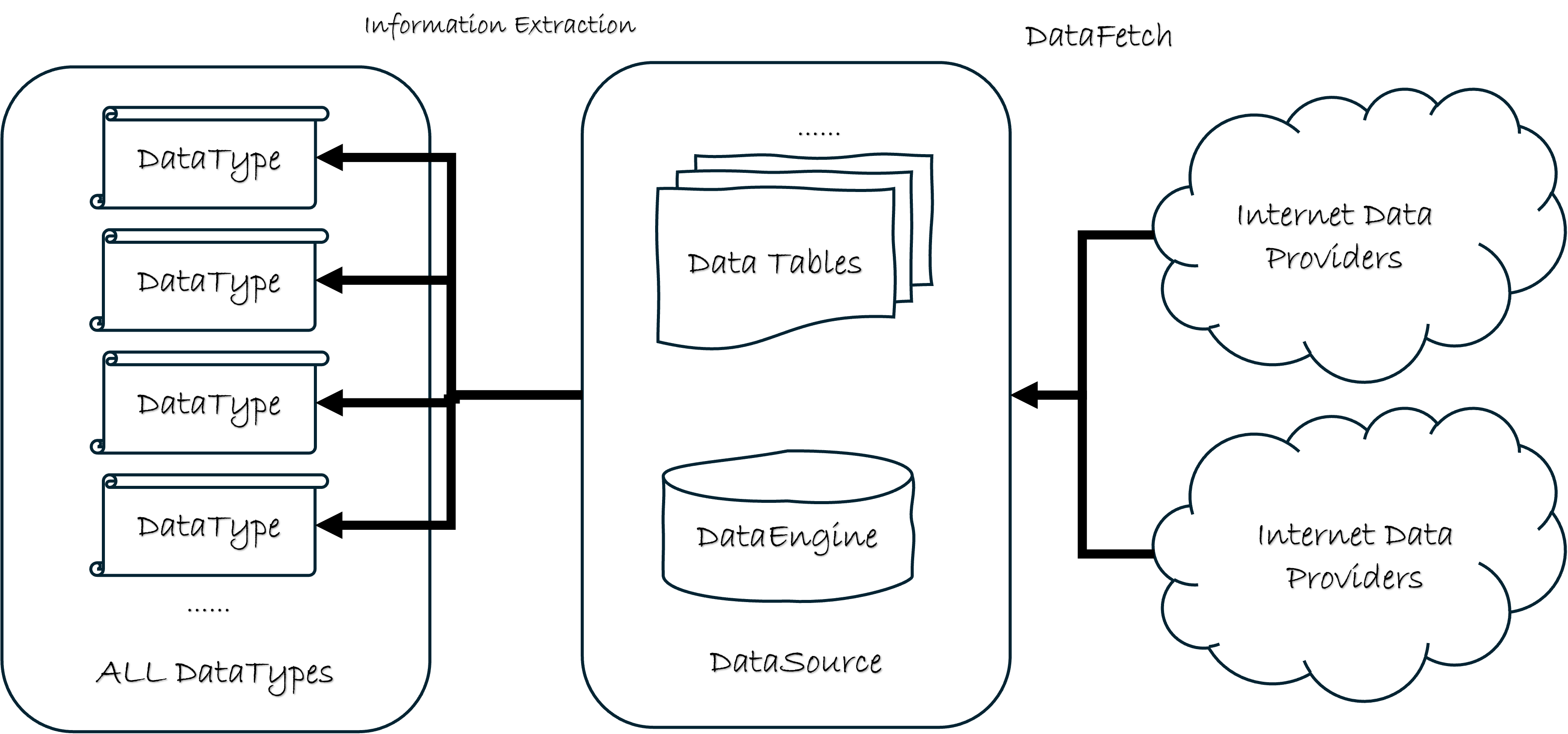
As shown in the diagram, qteasy’s data functionality is divided into three layers. The first layer includes various data download interfaces for obtaining data from online data providers; this process is called DataFetching. The second layer is one of qteasy’s core functionalities, defining a local database to store a large number of data tables and supporting multiple data engines. The core of this layer is the DataSource class. The third layer is the data application layer, which extracts meaningful information from the data tables and defines it as DataType objects. The process of extracting data is called Information Extraction. This DataType object is widely used internally within qteasy. Creating trading strategies, performing data analysis, visualization, and all subsequent work are based on the DataType object.
Because of the importance of financial data in quantitative trading, starting from the next chapter, we will introduce all the functional modules of Qteasy’s data capabilities in detail in the following order (reading order follows the file name numbering: 2 → 2.5 → 2.6 → 3 → … → 10):
2. DataType Objects and All Data Types — The difference between information and data, DataType objects, and a list of all built-in data types.
2.5. HistoryPanel (Historical Data Panel)—A three-dimensional container with multiple targets, multiple metrics, and time alignment; its integration with
get_history_dataand commonly used slices.2.6. HistoryPanel Visualization —
HistoryPanel.plot()static and interactive plots, layout and optional dependencies3. Local Data Source — DataSource Object and Basic Operations
4.~9. Built-in Data Tables — Structure and Use of Each Data Table
10. Data Pulling and Channels — Pulling and populating data from different channels
实操最短路径(偏「玩数据」而非回测):先跟 教程 2.0:获取数据 下载最小数据集,再读 教程 2.5 §0 与 examples/data_playground_e2e.py;本 manage_data 章节作参考查阅即可。